
NordVPN vs. PIA: More Devices or More Everyday Extras?
Getting a VPN connected is only part of using it comfortably. You may also want a banking app to use your normal connection, a film to play without extra setup, or enough connections for everyone at home.
Private Internet Access and NordVPN both address those everyday needs, with different tools and device allowances. PIA offers unlimited connections and detailed controls, while NordVPN includes automatic streaming assistance and optional desktop protection.

NordVPN vs. PIA: Quick Comparison
| Feature | NordVPN | Private Internet Access |
|---|---|---|
| Streaming | Automatic SmartPlay | Streaming support and server options |
| Devices at once | 10 | Unlimited |
| Fast connection option | NordLynx, based on WireGuard | WireGuard |
| Kill switch | Supported apps; not Fire TV | Yes; advanced desktop blocking options |
| Split tunneling | Selected apps; Linux port/subnet rules | App controls on supported platforms |
| Ad and tracker blocking | DNS filtering; eligible desktop upgrades | MACE DNS filtering on supported apps |
Features vary by operating system and plan. Check the particular app if exclusions or content blocking are central to your purchase.
What Both VPNs Do Well
Either service encrypts covered traffic between your device and its VPN server. Your ISP sees the VPN connection, the provider forwards the traffic, and websites see the server's public IP.
HTTPS still protects secure page contents beyond the VPN server. Logins and cookies remain identifying signals, whichever provider you choose.
Both offer modern connection options: PIA supports WireGuard, while NordVPN's NordLynx uses it as a foundation. That gives you a practical starting point for browsing, calls, and downloads.
Actual performance depends on your device, network, and server location. A normal streaming session or video call tells you more about the fit than the protocol name alone.
NordVPN publishes independent no-logs assessment information. PIA's 2025 Deloitte announcement also links an assurance report you can inspect.
Read their scope and dates alongside each provider's current policy. These reports support the practices examined; separate account records and future software changes remain outside a blanket promise of privacy.
Where NordVPN Has the Advantage
Streaming Assistance Built Into the Connection
NordVPN's SmartPlay runs automatically in its apps. There isn't a separate streaming configuration to maintain, which is useful when you want to connect and watch a show.
PIA also supports streaming, and either provider can encounter a platform that rejects a VPN address. We like NordVPN's built-in assistance without treating it as guaranteed access to every service.
Optional Checks for Links and Downloads
NordVPN includes basic DNS filtering and offers eligible upgrades with download scanning and more detailed browsing protection. Those advanced features require supported Windows or direct-download macOS apps.
Its desktop protection tools can work without an active VPN connection. That's an appealing addition if you want help checking downloads throughout the day.
PIA's MACE blocks selected ads, trackers, and malicious domains through DNS filtering on supported apps. Compare it with NordVPN's basic filtering; the broader download protection belongs to an eligible NordVPN upgrade.
Where PIA Makes a Strong Case
Unlimited Connections
PIA allows unlimited simultaneous connections, while NordVPN permits ten. PIA has the clear advantage if more than ten devices need separate connections at once.
Count concurrent use rather than every device you own. If ten comfortably covers your household, the apps and included tools will matter more than the larger allowance.
More Detailed Routing Choices
PIA's split-tunneling controls let supported apps send selected traffic through or around the VPN. Its Linux app offers app-level choices, which can be useful for keeping one program on the ordinary connection.
NordVPN's Linux allowlist instead works with ports and subnets. On Windows and Android, NordVPN does provide app exclusions for that everyday use.
Excluded traffic uses the direct network and its normal public IP. A targeted exception can keep the rest of your apps in the tunnel without switching off the VPN altogether.
Router Coverage Is an Option Too
Both providers support compatible VPN-client router setups. A travel router such as the GL.iNet Slate Plus can share a configured connection with equipment that lacks a suitable native app.
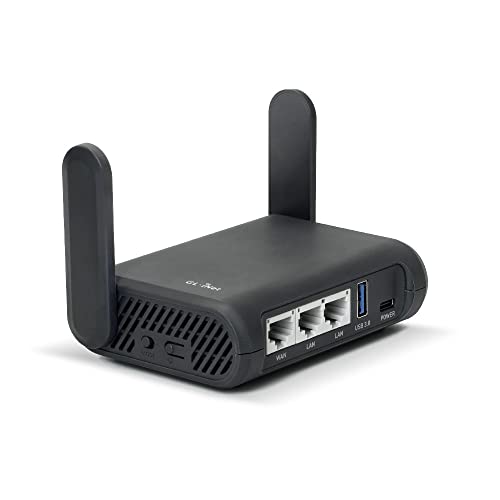
- Turns a wired or public wireless connection into a network shared by your own devices
- Includes WireGuard, OpenVPN, policy routing, and an optional VPN kill switch
- Runs OpenWrt and supports network storage, encrypted DNS, guest Wi-Fi, and AdGuard Home
Use a current provider profile and the firmware's setup instructions. Shared router coverage won't reproduce every feature of a Windows or phone app.
Which Subscription Is Better Value?
Compare the initial charge, subscription length, and renewal price for the features you need. Unlimited connections add value when you use them; optional security tools do the same when they fit your devices.
NordVPN's core subscription already includes ten connections and SmartPlay. Start there if you want the VPN and streaming assistance, then consider an upgrade for the supported desktop tools.
PIA is especially attractive when its included device allowance and routing controls solve a specific requirement. Paying for extras elsewhere won't replace an app control you actually need.
Our Verdict: NordVPN
NordVPN gets our vote for everyday convenience when ten connections are enough. Automatic SmartPlay and the option of broader desktop protection make a compelling combination for browsing and regular streaming.
PIA remains a strong alternative for larger households and people who want its detailed routing choices. If those aren't requirements, we'd put NordVPN first on the shortlist.
Our NordVPN review explains which tools come with the VPN and which require an upgrade.
Explore NordVPN plans and current offers
NordVPN Review: Streaming, Privacy, and the Extras That Matter
