
Proton VPN Review: What Changes When You Move Beyond Free?
Proton VPN lets you leave a free connection running without watching a monthly data counter. Its paid plans build on that foundation with more device connections, streaming support, and tools that change how traffic is routed and filtered.
Proton VPN at a Glance
| Feature | What you get |
|---|---|
| Streaming | Dedicated streaming support on paid VPN plans |
| Devices at once | Free: one; VPN Plus: ten |
| Data allowance | Unlimited on Free and paid plans |
| Kill switch | Supported apps; modes vary by platform |
| Split tunneling | Paid feature on selected apps; Mac limitations |
| Ad and tracker blocking | NetShield on paid VPN plans |
The plan comparison separates Free, VPN Plus, and bundles with other Proton services. Unlimited free data doesn't include every paid feature.

Streaming, Speed, and Everyday Use
A Free Connection Without a Data Deadline
Proton's free plan provides ongoing VPN access with unlimited data on one device. That gives occasional browsing and longer work sessions room to continue without buying more bandwidth.
Paid plans add wider location choice and supported streaming access. Judge the free service on its own available servers and controls, rather than treating it as a complete preview of VPN Plus.
Streaming and More Connected Devices
VPN Plus raises the simultaneous connection allowance to ten and adds streaming support. Proton offers apps for major computers and phones as well as supported television platforms.
A streaming service can still reject a VPN address. Check your normal apps and viewing devices, since a supported platform isn't a promise that every catalog will remain available.
Let the App Choose a Connection
Proton's protocol guidance describes automatic selection and the alternatives offered by different apps. WireGuard is a modern option where supported, while Stealth can help on networks that try to identify VPN traffic.
Stealth availability varies by platform and release, and no protocol guarantees access everywhere. For ordinary use, server distance and your local connection still matter more than the length of the protocol menu.
What Proton VPN Does for Your Privacy
Covered traffic travels through an encrypted tunnel from your device to a Proton server. Your local network sees that tunnel, Proton forwards the traffic, and websites see the server's public IP address.
HTTPS continues protecting secure page contents beyond the VPN server. Websites can still recognize your logins and cookies.
Proton publishes app source code and independent no-logs assessments. These provide material to inspect beyond the privacy promise, with each assessment covering particular systems and periods.
Account, payment, and support records are separate from browsing activity. Open code and audits make scrutiny possible without proving that every future connection or app version is flawless.
Privacy Tools Beyond the Basic Connection
NetShield Filters Unwanted Destinations
Paid plans include NetShield, which checks DNS lookups against lists of selected unsafe, advertising, and tracking domains. It can stop those resources loading before they clutter a page or make another tracking request.
DNS filtering doesn't scan downloaded files like antivirus software. Custom DNS settings can also bypass the intended filter, so check those settings if NetShield isn't taking effect.
Secure Core Adds Another Server
Secure Core routes traffic through a hardened entry server in Switzerland, Iceland, or Sweden before the exit server. It adds separation when you're concerned about someone monitoring the exit infrastructure.
That extra hop can increase latency, so it isn't necessary for every stream or browsing session. Websites still see the exit IP, and the route doesn't remove identification through accounts.
A Few Settings Worth Knowing
Exclude Traffic Only Where Supported
Proton's paid split-tunneling feature provides selected routing controls on supported platforms. Excluded traffic uses the direct network and its public IP while covered traffic remains in the tunnel.
The experimental Mac feature supports app exclusions, but not Safari or other WebKit apps. It requires the network extension and WireGuard or Stealth, so check those requirements before relying on it.
Match the Kill Switch to Your Setup
Kill-switch options differ across Proton apps, including whether traffic stays blocked outside an active VPN session. Some platforms also restrict combining the kill switch with split tunneling.
Check the current instructions for your device and try a brief connection interruption. That is enough to see whether the chosen mode pauses traffic and reconnects as you expect.
Taking Proton VPN on a Trip
Proton supplies router setup instructions for compatible WireGuard and OpenVPN configurations. A travel router such as the GL.iNet Slate Plus can share one configured connection among your own devices.
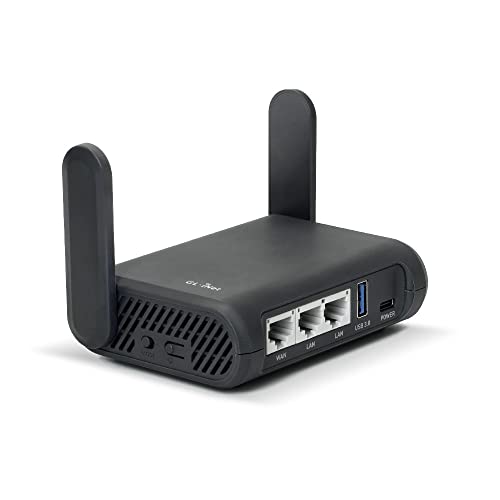
- Turns a wired or public wireless connection into a network shared by your own devices
- Includes WireGuard, OpenVPN, policy routing, and an optional VPN kill switch
- Runs OpenWrt and supports network storage, encrypted DNS, guest Wi-Fi, and AdGuard Home
Complete any hotel Wi-Fi sign-in before connecting the VPN. Router profiles have their own available features and routing rules, so don't assume every app toggle carries over automatically.
Choosing a Proton VPN Plan
Free is a way to assess basic connectivity without a data cap. VPN Plus adds the streaming, device allowance, and privacy tools described here, while broader bundles add other Proton products.
Compare the full subscription charge and renewal price against the features you'll use. There is little reason to count bundled email or storage as savings if you don't need those services.
Is Proton VPN a Fit for Your Routine?
Separate your requirements into basic private browsing, streaming and device coverage, and optional routing or filtering. That makes the difference between Free and VPN Plus easier to evaluate.
Then check any essential control on your actual operating system. Proton's range is useful when the plan and app together supply the features you need.