
VPN for Brazil: Keep Up With Home, Wherever You Land
A Brazilian VPN server can give your connection a Brazilian address, which sounds dull until a stream says you're in the wrong country. It still can't promise you the match—or stop the family group chat from spoiling every goal.
That's the appeal and the limit of a VPN for Brazil. It can change how your connection reaches a service and add network privacy, but the service still gets a say in what happens next.
The Match Didn't Travel With You
For a Brazilian abroad, the problem can begin with something as ordinary as sitting down to watch football. The same account that worked at home may offer different content in another country.
A Brazilian VPN server changes the public IP address that a website sees for traffic sent through it. That can matter when the site uses an IP address to estimate your country.
It doesn't supply a missing subscription, though, and streaming services can block VPN addresses. Before paying for a long VPN plan, check the current rules for the service and program you actually want.
There's an option the VPN ads can skip: Globoplay also offers shows outside Brazil in supported countries. The lineup differs, so check whether the thing you miss is already there.
If it is, you may not need a VPN for that job at all. If it isn't, don't turn “has Brazilian servers” into “will definitely show tonight's match.”

Going to Brazil Flips the Problem Around
A visitor in Brazil may be trying to reach services from home instead. A home-country VPN server can change the country shown by the connection, but accounts can use other clues as well.
Bank logins deserve particular care. A familiar country on the server list doesn't guarantee that the bank will accept the connection, and a shared VPN address can bring extra checks of its own.
Before traveling, check that your usual sign-in method will work abroad and save the bank's official support details. Fixing that at home is easier than doing it while a taxi waits outside.
Protect the email account you use for bookings and account recovery, too. A VPN can't stop someone signing into it with stolen credentials.
A security key adds a physical sign-in check to accounts that support it. Check that yours does, and set up a way back in if you lose the key on your trip.

- Focuses on FIDO-based passkeys and account authentication without the extra protocols in the YubiKey 5 line
- Uses USB-A on computers and NFC on compatible mobile devices
- Provides a durable, battery-free second factor for supported personal accounts
The Time a VPN Became a National Argument
Brazil's VPN conversation took a sharp turn in 2024, when the country blocked X. Suddenly, changing an internet connection wasn't just a way to catch up with a show.
Brazil's top court upheld a daily fine of R$50,000 for getting around the block, including with a VPN. That was a penalty for evading the order, not for every use of a VPN.
The court authorized X's return on October 8, 2024. That is a past episode, not a claim that the same block is in force today.
It does explain why “the app can connect” and “you're allowed to use it this way” are separate questions. If a new court order affects a service, check that order rather than relying on an old VPN guide.
What Your Internet Provider Still Knows
Away from streaming and headlines, a VPN has a quieter use: giving your internet provider less detail about your browsing. It routes traffic through an encrypted connection to the VPN server.
For traffic inside that connection, your provider sees the VPN server instead of direct connections to the sites you visit. It still knows you're connected and can see timing and data volume.
The VPN doesn't erase your internet account, remove records already kept, or hide you from a service you're logged into. It changes part of the route, not every record of the trip.
You also shift trust toward the VPN company. Look for clear information about what it collects and how its privacy claims are checked, rather than treating a large Connect button as proof.
Get the Hotel Room Online Once
A phone, laptop, and tablet can turn a hotel login page into a small family project. Each device wants a connection just as everyone wants to use it.
A travel router can share the hotel's connection through your own Wi-Fi network. With a compatible VPN set up on the router, the devices using that route can share its VPN connection too.
The GL.iNet Slate Plus supports that kind of setup. It still needs internet access, the hotel's login may need attention, and you'll need to configure a compatible VPN service before the tunnel works.
If you're traveling with one phone, start with the phone app instead. The extra box earns its place when it saves you repeated setup, not merely because it fits in your luggage.
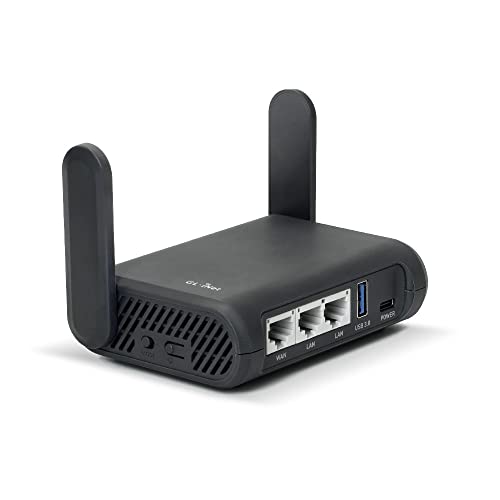
- Turns a wired or public wireless connection into a network shared by your own devices
- Includes WireGuard, OpenVPN, policy routing, and an optional VPN kill switch
- Runs OpenWrt and supports network storage, encrypted DNS, guest Wi-Fi, and AdGuard Home
Choose a Connection You Can Live With
For daily browsing in Brazil, try a nearby Brazilian server first. If you need an address from home, choose a server there and check that the service you want works.
Distance, busy servers, and your Wi-Fi or mobile signal can all affect speed. If a video stalls, try another nearby server and check whether the internet is slow with the VPN off, too.
For public Wi-Fi, confirm the network name, complete any normal login page, and make sure the VPN connects afterward. Enable auto-connect and the kill switch where your app supports them, after reading how they behave.
If you mainly want privacy on shared networks, judge the VPN on that daily job. If you're buying it for one stream, test that specific use while you still have a refund option.
Keep a workable connection, protect the accounts that matter, and check the viewing rules before kickoff. That leaves the football as the evening's main source of drama, which is probably where it belongs.